
Contingency Planning
The best way to deal with emergencies is to head them off before they even occur. A key component to avoiding the unexpected during a flight is proper mission planning. While what is deemed necessary to consider in such planning will vary greatly based upon the type of mission, following are examples of important things to contemplate:
- Flight path
- Emergency and contingency plans (e.g., potential landing areas)
- Software and hardware settings and setups
- Local terrain
- Nearby obstacles
- Visual line-of-sight requirements
- Micro-weather issues (such as wind speed increases between building in urban environments)
- Bystanders or other non-participants
- Animals
- Surrounding property
- Airspace
- Communication requirements and procedures
- Privacy concerns
- Property rights/trespass concerns
- Crew/operator experience
- Anything and everything else you can think of that is applicable to your operation
For each of these items, think about how you will conduct your mission so as to mitigate any impacts they may have on the safety or complexity of the mission. If other people in addition to yourself are participating, all of these items should be thoroughly discussed in your crew briefing. Make sure each person’s duties are clearly delineated and procedures are known. For example, what does the visual observer do if they lose VLOS? What should the person operating the controls do if they spot a crewed aircraft in the area? How does the remote PIC positively take control of the sUAS from the operator of the controls (in a way that avoids any possible confusion about “who’s flying”)? With these kinds of contingency plans, if anything goes wrong, it’s likely there is a plan in place to deal with it and, if not, there is a chain of communications that is expected to occur that will ensure the situation is handled as it unfolds.
Ground Emergencies
If you’re going to have an emergency, it’s best to have it while your aircraft is still on the ground. Emergencies are no fun even on the ground, but generally, they are easier to deal with there than in the air.
A serious concern when using high-capacity (i.e., LiPo) batteries is that they may catch on fire. As long as you take care of them properly and inspect them thoroughly prior to each use or charge, the fire risk should be very small. To prevent a fire, only discharge batteries to 20% of maximum charge during each cycle. However, if a fire happens, you should be prepared. Never leave a charging battery unattended. Avoid charging on or near flammable materials, in enclosed areas (such as cars), or in critical locations. Use a battery charging bag and ensure you’re using it properly. All of these actions will minimize the danger if a battery ignites. Warning signs of an impending problem are bulges in the wrapping material surrounding the battery, smoke, or hissing sounds. Remove the battery from any power sources at the first indication of glitches. If it actually catches fire, the best thing is to try to prevent the thermal runaway from getting worse and spreading to other parts of the battery (all it takes is for one cell to ignite, which then heats the next one, and the next, and so on). Use whatever extinguishing capacity you have on hand, though it is likely the battery will have to burn itself out of “fuel” prior to being safely out. Even if the battery appears to be extinguished, use extreme caution, as it could reignite at any moment. Search the Internet for videos on LiPo battery fires and attempts to extinguish them—these events can be pretty scary. Always know who to call, such as the local fire department, if the situation gets out of hand.
What if the sUAS won’t turn off? Spinning blades and body parts don’t mix well. Usually, this situation occurs because of confusion by the onboard computer. Most sUAS have an emergency shutoff command or button on the ground controller. Alternatively, cycling through the start/stop sequence may help, or inputting some control commands may get the system to react properly. This is where system knowledge is paramount; a lot of headaches can be avoided if you actually know how to work all the features of the sUAS and are familiar with any and all of its quirks. Internet chat rooms and blogs are great sources to learn about some of the more common problems as well as solutions to issues you may encounter. In the worst case, try to access the “off” switch of the aircraft without hurting yourself, and shut the unit off manually. (With dangerous systems like those with large propeller blades, for example, it may be safer to allow the battery to drain to the point of system shutdown—it’s better to lose a battery than a finger.)
Another ground emergency situation is if non-participants come into the launch or recovery area. It is shocking what some people have done when they feel as though they have been “harassed” by a drone. Again, search the Internet for a series of entertaining videos on the topic. With that said, you don’t want anyone to get hurt, and sUAS can potentially be dangerous. If an unexpected guest (two- or four-legged) enters the scene, be sure to shut down the system immediately.
Inflight Emergencies
Prior to flying any sUAS, you should become intimately familiar with all of the aircraft’s documentation. While some manufacturers provide ample details about their products, others do not. In such cases, it is wise to see what information is available online. A wide range of sources of helpful materials exist on sUAS discussion boards, including checklists and common problems or questions associated with specific sUAS models. Additionally, some preflight study is required to ensure you are well-versed on emergency procedures, because during an actual emergency is not the time to be wondering what to do next. While each sUAS is unique in terms of the potential emergencies that may be encountered, this section will discuss emergencies that are common in a variety of sUAS types as well as those that may have severe impact on the aircraft or persons and property. It is wise to develop emergency procedures or checklists for each sUAS you fly, if these resources are not available from the manufacturer (or other sources).
Scenario: Loss of GPS Signal and Inadvertent Fly-Away
A pilot conducted an automated mapping flight using GPS navigation over a rural area. Suddenly, the sUAS lost its GPS signal, likely due to temporary interference. The pilot was not immediately prepared to switch to manual mode and reorient the drone visually. Before they could react effectively, the sUAS, lacking GPS lock and clear manual input, began drifting rapidly with the wind away from the intended operating area. The Return-to-Home function, which relies on GPS, failed to activate correctly. The drone eventually flew out of visual line of sight and was lost, presumed to have crashed remotely. This scenario emphasizes why remote pilots should maintain situational awareness, be prepared to take manual control, and understand how automated features like RTH may be affected by system malfunctions or environmental factors like signal loss.
In crewed aircraft, there’s a saying used to describe what the priorities are when dealing with an emergency: aviate, navigate, communicate. The point is to keep flying the aircraft. The same can be applied to sUAS: Don’t let a distraction lead you to let the sUAS crash into something (especially a person!). The next priority is to maneuver the sUAS as needed to deal with the urgency or emergency. Lastly, you communicate—normally this means to ATC. For example, if you can’t do what ATC has asked you to in Class D airspace because of a malfunction, communicate with them about it. To summarize: fly first, talk later.
One of the most concerning emergencies for remote pilots is the fly-away. A fly-away can be best described as an instance when the operator loses positive control of an sUAS. If you suspect that you have lost control, provide a control input; if the aircraft does not react, you’re likely to have a serious problem. In extreme cases, fly-aways can involve an aircraft literally zooming off in an uncommanded direction with rather unfavorable results (for both the sUAS and anyone or anything in it way) (Figure 8-1). If you need examples of fly-aways, simply search for videos online using the key words “drone” and “fly away.” There is little to nothing you can do in the event of a fly-away except perhaps to duck. Seriously, though, you will want to alert anyone in the immediate area that you have lost control (yell “fly-away!”). It’s recommended to include this procedure in your preflight crew briefing. Of course, attempts should be made to regain control, such as moving control sticks, and pressing emergency, land, or return to home buttons.
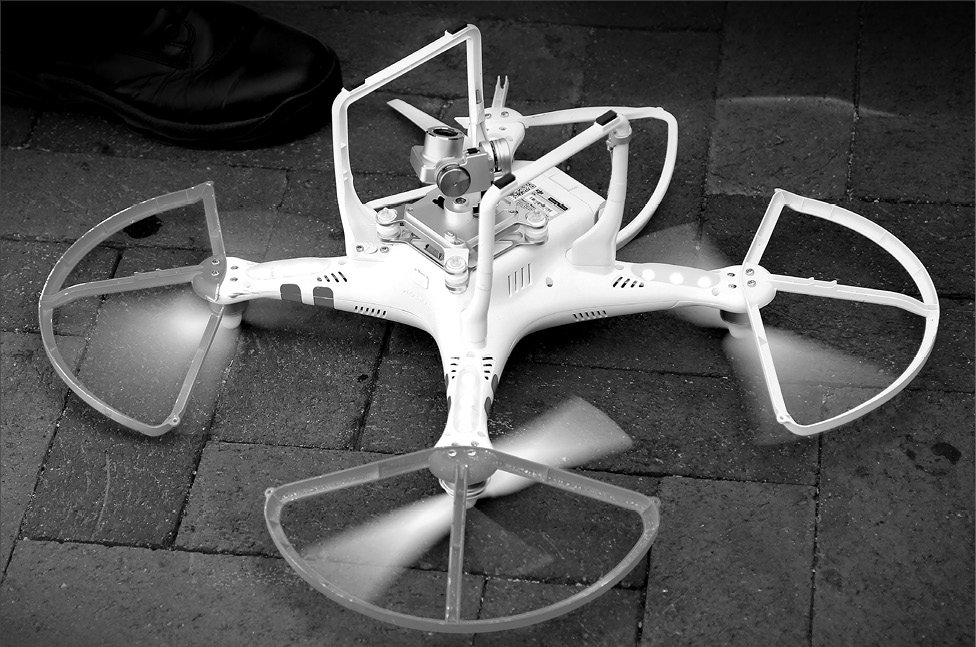
Figure 8-1. This UAS crashed into the ground upside down following a fly-away. (Bill Morrow; flickr.com/photos/billmorrow/14765710213; CC BY 2.0.)
Another type of unpleasant emergency is engine failure. Until sUAS have been flown for a while, it is unclear as to exactly how long certain components are expected to last—but nothing lasts forever. Still, engine failures due to mechanical causes are rare; engine stoppages are often the result of running out of battery power (or fuel), which is an unforgivable and preventable sin. The individual at the controls of the sUAS and all crew should constantly be thinking of where to put down in case of an engine failure (or any other problem). Emergency landing spots should be away from people and property, preferably in an open area. When choosing possible landing sites, remember that the airplane itself is expendable, but people are not. If you can reduce momentum by shedding wings or other components against trees, bushes, or rocks, you will reduce the impact on bystanders.
Many emergency landings could have been avoided if the pilots had made precautionary landings when things started to unravel. There is nothing wrong with landing before the mission is complete or at a location other than the launch site. Never push your luck with battery (or fuel) levels; it’s best to land with plenty of extra rather than find out you’re a bit short. Don’t let your ego write checks that your batteries can’t cash.
For quadcopters, the loss of a single engine will most likely lead to loss of control. Multicopters with more than four engines will fare better (essentially the more engines, the better it will handle a single engine loss). Some larger multicopters are designed to be able to fly following an engine failure. Since most fixed-wing sUAS only have one engine, if it stops working, the aircraft becomes a glider. In this case, considering that you are not in the aircraft, figuring out how to maneuver the aircraft into a position to make a safe landing may be challenging. Thus, preflight planning is needed so that you will have a plan if this happens at various points during the mission, especially in critical areas (such as near people or property).
You can avoid user-induced engine failure most easily by always ensuring you have ample battery power (or fuel) to make it back to the recovery location or at least to a safe landing zone. With most new sUAS, there really is no excuse for running out of juice, as control stations provide a constant readout of battery. If yours doesn’t, you need to pay close attention to warnings provided by the manufacturer (such as flashing lights on the fuselage). For sUAS using fuel, you will want to always know the amount of time the engine(s) have been running compared to how much time you can run the engines, based upon starting fuel quantity.
Structural failures can also turn a nice day of flying into a stressful event. Propellers can come apart if they are damaged or have some inherent weakness (such as damage encountered on a previous flight). Propeller blades can injure people proximate to the site of failure. Moreover, if a propeller fails, it is considered equivalent to an engine failure and must be handled accordingly.
If you properly inspect your battery prior to use and have cared for it properly (charging and discharging it within the manufacturer’s guidelines), you should rarely if ever have to worry about a battery fire. If you notice hissing noises, smoke, or flames coming from any portion of the sUAS, land it immediately and shut down all engines. Unfortunately, there is not much you can do in the case of modern (LiPo) batteries, as the contents of the battery are the fuel and provide the heat source for continued ignition, which can quickly spread to other cells within the battery, igniting them as well. The best means of dealing with battery fires is to use whatever means you have to lower the temperature of the battery—e.g., water, a “typical” fire extinguisher, sand, etc. This may prevent the fire from spreading to other cells. Most likely, however, the fire will burn until the expendable contents of the battery are exhausted (Figure 8-2). Move all persons, property, and flammable items away from the area. If there is a risk that the fire will spread beyond the battery, call the local fire department for assistance.
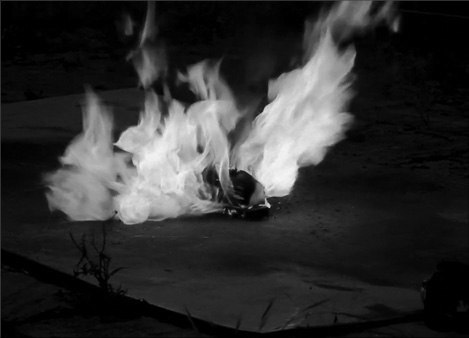
Figure 8-2. LiPo battery fire.
Loss of datalink (lost link) can also be a major problem for some sUAS, although many systems have failsafes that engage automatic features—such as return to home following loss of link for more than a few seconds. This is why setting up the return home function is so important prior to launch. If you don’t have the right parameters set, your sUAS may return home into trees or not have a lock on the “home” position. Efforts should be made to reestablish link, such as by moving ground station antennae, relocating into a clear signal line-of-sight (ensuring no buildings or other objects are close by or in between you and the aircraft), or moving closer to the sUAS. If you encounter two datalink losses on a flight, it is important to terminate the mission to investigate potential equipment problems.
Similar to loss of datalink, the failure of the ground control station (GCS) is another possible inflight emergency. The easiest way to avoid this is to ensure that the GCS is properly charged prior to operation. (I know this sounds obvious, but it has been overlooked by many unsuspecting pilots). If an actual hardware or software failure occurs, there is not much you can do unless you have a spare controller (and it is paired or pair-able to the sUAS). Otherwise, you will have to treat the event as a lost link scenario. Hopefully you have a system that will automatically return home or perform some other failsafe function. See Figure 8-3.
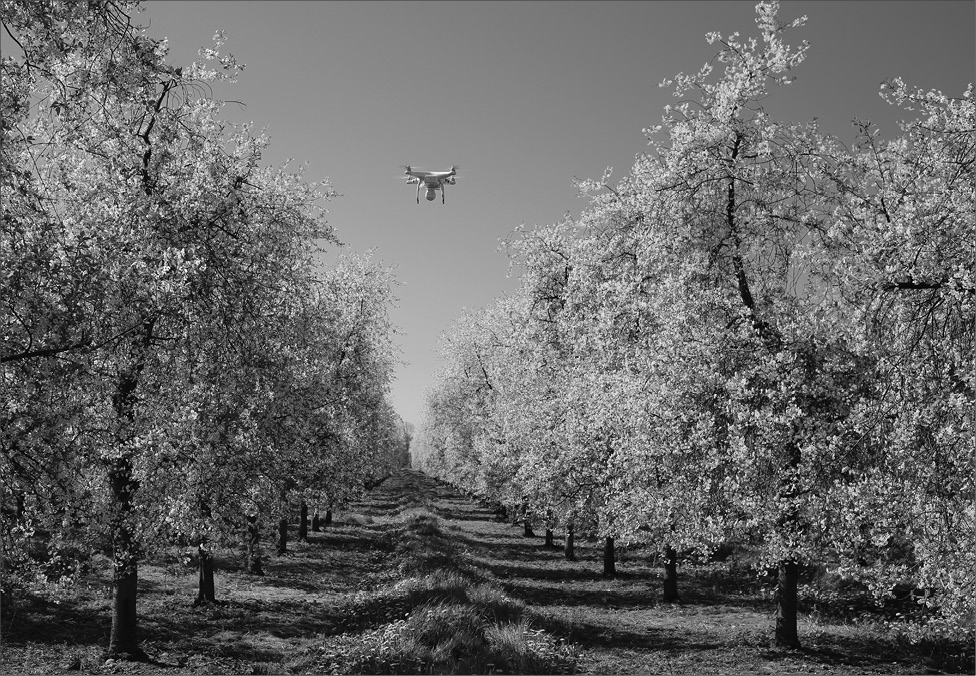
Figure 8-3. Any lapse of attention or system failure could quickly turn into an emergency when flying sUAS, especially in confined spaces and around people or property. (Lars Plougmann; flickr.com/photos/criminalintent/13931871659; CC BY-SA 2.0.)
Not all sUAS use GPS, but more than likely you will be flying one that does at some point soon. Many sUAS use GPS for automatic flight capabilities and/or added stability. Losing GPS generally means that you will have to revert to “manual” flight, and typically this will result in a degraded mode that is a little more squirrely. Other than that, things should be all right for the majority of sUAS missions. However, as previously mentioned, if loss of GPS is then followed by loss of datalink, you may be in for some trouble. Any safety features, such as return to home, will not work (unless you’re flying something pretty impressive with dead reckoning navigation onboard, which is unlikely).
If anything else unexpected happens—such as if you’re on an automated flight plan and the autopilot software crashes or has a hiccup—it makes the most sense to manually take over and have the aircraft return to base so you can determine what went wrong. You really don’t want to be experimenting with potentially problematic equipment; this is best done by conducting a test flight under controlled conditions where the effects of any failures can be managed. Perhaps your sUAS is not abiding by a geofence you set (this is a maximum altitude or distance that the onboard computer will let the aircraft fly from the ground controller). In this case, it is most likely because you set the geofence incorrectly—but it could be something else. Therefore, it is best to figure things out on the ground before troubleshooting more.
What if you are simply disoriented? If your sUAS gets a bit far out, it can be hard to tell which way it is flying or how it is oriented. This type of situation can get hairy quickly if you let it. If this occurs, the best thing to do would be to make a small control input, such as left or right. You will then see if it is facing away from you (if you push left, it goes left) or facing towards you (if you push left, it moves right). You can then use the front/back control to bring it closer to reestablish orientation (or turn it towards you for a fixed-wing). You can also switch to “headless mode” if it is installed, which will always keep the vehicle moving per your control inputs regardless of which direction the sUAS is facing. This eliminates “having to think backwards” in terms of the flight controls when the aircraft to heading towards you. The key is not to panic. In most cases, if you simply let go for a little bit, things will calm down.
If you do have an emergency in Class B, C, D or special use airspace that requires authorization to enter, you will want to notify ATC as soon as practical. Remember that only FCC-licensed users can transmit on aviation frequencies. Regardless of the means of communication, don’t expect a controller to understand your problem if you use highly technical terms such as “I lost my GCS.” Most controllers are not likely to be remote pilots, so using language that would be crystal-clear only to another remote pilot may be useless. Instead, just say something like, “I am unable to control my drone.”
Remember that the regulations allow the remote PIC to essentially do whatever is necessary in response to an emergency—even if it means disregarding other portions of the regulations. Of course, this does not provide an excuse to do whatever you want simply because you had a bad day flying, but if you need to do something outside of the rules to prevent harming people or property, you should not hesitate to do so. If you do bend any rules during an emergency situation, be prepared to write up a report for the FAA, if asked to do so.
There is an old wives’ tale that a pilot who declares an emergency is inundated with a flood of paperwork when the emergency is over. This is not true. The controllers who handle the situation might ask for a phone call to get the details, but the purpose of the call will not be to issue a violation.
Emergency Communications
The international distress frequency for VHF is 121.5 MHz. It is highly recommended that you monitor (listen to) this frequency whenever possible. (Note: if you hear a weird siren sound on 121.5, this is likely an aircraft Emergency Locator Transmitter [ELT] emission. Unless it is within the first five minutes of the hour, when ELTs are allowed to be tested, this means a plane may have crashed nearby. Contact the closest FAA facility to report the situation.) In the case of a serious emergency for which you are not already in contact with ATC, you may want to arrange for assistance from other agencies, such as the local fire department. If you are already in contact with ATC, such as a control tower, simply communicate your emergency to them. The key word to use in emergencies is “mayday.”
An “urgency” situation is supposed to be communicated by repeating the word PAN three times—but to my knowledge, nobody does this. You are in an urgency situation when you are concerned about the safety of your flight and need timely but not immediate assistance. Examples of an urgency situation include disorientation, low battery, deteriorating weather, etc.
Other “Surprises”
Each sUAS has its own unique personality in terms of odd manufacturer programming, required techniques, finesse necessary to maneuver, and so forth. Always be alert to the unexpected. Following are a few examples of things that may go awry.
You are all ready to go, but alas—your sUAS doesn’t want to start. Before sticking your hands in harm’s way of propellers, make sure you’ve done the required sequences to get the unit up and running. If necessary, go through your checklists again. Look for obvious issues first, then go on to the less common possible causes. I recall watching one remote pilot prepping to fly a demonstration flight, but they just couldn’t seem to get the darned thing to start and fly. After about 30 minutes of embarrassing dilly-dallying, they determined that the sUAS would not allow the unit to fly because it was within the geofence parameters set up by the manufacturer due to the proximity to an airport. As previously mentioned, the more familiar you are with all aspects of your systems, the better off (and safer) you will be, avoiding heartache and unwanted surprises.
An sUAS may perform some unanticipated actions or movements without resulting in an actual fly-away or causing a major issue. If the unit appears to be doing something funky, it is best to troubleshoot on the ground. Consider tethering the system if you deem there is risk of a fly-away or other issue. Or alternatively, find a safe enclosure in which to do your testing. In short, you don’t want to take an oddly acting sUAS on a mission without first diagnosing and solving the ailment.
Some of the unexpected situations associated with flying sUAS have nothing to do with you or the aircraft. People, wildlife, and property may all introduce themselves without warning. According to regulations, you must avoid overflying non-participants (unless you have a waiver). People are curious (or sometimes malicious) and may insert themselves below your aircraft or attempt to do things to it (e.g., grab it, break it). Calmly move the vehicle away from the person and out of harm’s way, trying to secure a landing spot away from the disorder. Even if you have every right to fly your system in a location, respect people’s concerns about privacy. You do not want to get into an argument with someone about the legality of your operation while the unit is flying. If there is a problem with persons in the area, it is best to abort the mission and seek help from local law enforcement, as necessary. If someone damages or destroys your sUAS in the process of their agitation, don’t get sucked into doing something in retaliation. That’s where you could end up in legal trouble yourself. Simply gather as much evidence as you can (you will likely have video; check to see if anyone in the area can be a witness) and call law enforcement to file a complaint.
Speaking of law enforcement, they themselves may be the cause of unsuspected strife. Again, it is best not to argue with officers of the law, particularly while your sUAS is still flying. Tell the officers you need to land the aircraft and then you can discuss the situation. Many police do not know or understand the laws controlling sUAS, but they also don’t like to hear law lectures from citizens. It is all right to ask what law or other issue you are supposedly in noncompliance with. With that said, it is best to pick your fight another day by visiting their supervisor at a later point at the local headquarters or station.
Review Questions
1. The remote pilot-in-command is authorized to take any action necessary to deal with an emergency situation, including
A—violating any regulation in 14 CFR Part 107.
B—disregarding the safety of persons in the area.
C—disregarding regulations that impede the response to the emergency.
2. When experiencing an emergency during a flight in Class D airspace, the remote pilot-in-command should immediately contact
A—any station listening on 121.50.
B—the control tower on the current frequency being used.
C—the airport manager via the telephone.
3. Which action is recommended during a lithium polymer (LiPo) battery fire?
A—Try to heat the battery to expedite the use of remaining fuel.
B—Try to cool the battery to prevent further damage to cells.
C—Place the battery into a battery charging bag.
4. Which is not something that can be done to prevent a lithium polymer (LiPo) battery fire?
A—Charge the battery only when at room temperature.
B—Place the battery into a battery charging bag.
C—Be sure to drain the battery completely before recharging.
5. Which is something that can be done to prevent a lithium polymer (LiPo) battery fire?
A—Charge the battery only when the outer coating is bloated.
B—Only discharge batteries to 20% of maximum charge during each cycle.
C—Be sure to top off the battery charge prior to flight even if it is assumed to be fully charged.
6. The best procedures to use during an emergency are
A—those provided by the manufacturer.
B—those provided by pilots who fly the same sUAS model.
C—those outlined within the Aeronautical Information Manual.
Answers:
1-C, 2-B, 3-B, 4-C, 5-B, 6-A.