
Regulatory Requirements
Since an sUAS potentially operates in proximity to and within the same airspace as crewed aircraft, a high level of care is required to ensure that the aircraft is safe to operate and will not do anything to jeopardize the ability of the remote PIC to maintain positive control of the system while in use. The FAA explicitly spells this out in 14 CFR §107.15, stating that prior to each flight, “the remote pilot in command must check the small unmanned aircraft system to determine whether it is in a condition for safe operation.” Further, if at any time it is determined that this condition is compromised, the operation must cease immediately. Uncrewed aircraft pilots should mimic their crewed counterparts who are very familiar with the preflight inspection process, which is (or should be) a very thorough evaluation of the aircraft before taking flight.
While crewed aircraft manufacturers typically provide a comprehensive checklist to use for preflight inspections, not all sUAS manufacturers do so. It may be necessary to create your own checklist. However, you may not need to start from scratch—or worse, learn the “hard” way; instead, look online to find out what work has been done on your individual system. Some great resources are available on various websites, especially for systems with minimal documentation provided by the manufacturer. In short, if the aircraft comes with a checklist or procedure for ensuring safe operation, use it. Feel free to add to it if you find some additional things that you feel need to be checked prior to use. If no such guidance is provided, create your own. So what should you include? Let’s take a look.
Preflight Inspection Considerations
While each sUAS will vary, here are some key areas to consider for careful inspection before flight or on a regular basis. Before every flight, it’s important to do a thorough visual examination of the aircraft. Are there any loose parts? Is anything hanging off that should not be? Does anything look abnormal? Is there any damage to the structure? Next, you should take a look at the propellers. Before putting them on the aircraft, flex the blades slightly to confirm their integrity. While you are doing this, look over the blades and run your finger along their edges and surfaces. If there are nicks or cracks, you should replace the propeller. Once they are installed on the aircraft, propellers should be secure (and locked if applicable), but don’t overtighten them, as that can damage the threads or connections.
While you are in the vicinity of the motors, check them for proper rotation and security. Do they spin freely? Is anything sticking? Are any motors too loose? The best way to know for sure is by comparing one motor to another (or if the sUAS only has one motor, comparing it to how it appeared the last time). If anything is abnormal, it is advisable to remove and replace the item in question. (More experienced users may want to do some bench tests prior to replacing or flying.)
Next, check all peripheral items, such as the camera gimbal or other payloads. Are they properly connected and secured? How about the camera or other sensors? These typically are expensive pieces of equipment; you do not want to accidentally damage or lose them because you were in a hurry to fly.
You will also want to inspect the battery prior to installation. Note: be sure you know the correct power-on procedures for your sUAS. Some will be powered once the battery is installed, so if that is the case, you will want to be ready for that change in status. Typically, the controller is turned on first and then the sUAS is turned on, to reduce the chances of something unexpected happening (and if it does, by following this procedure, you should have control).
Check the battery connection pins/slots to verify that they are not damaged or dirty. Check the body of the battery. Is there any “puffiness” or bulging of the outer coating or sides (see Figure 10-1)? If the answer is yes, your battery is failing. Never use a puffy or bulging battery. Is the battery warm or hot? If so, let it cool before using. Do you know the charging status? If not, it is best to know this before flight for quality assurance and performance tracking. Once you are happy with the battery’s status, install it (or position it for installation).
The ground control station and other equipment also should be inspected. Are the antennae properly installed and attached? Are there any missing or loose parts? What is the battery status of the components? Will the capacity be enough to complete the mission with an additional time cushion?
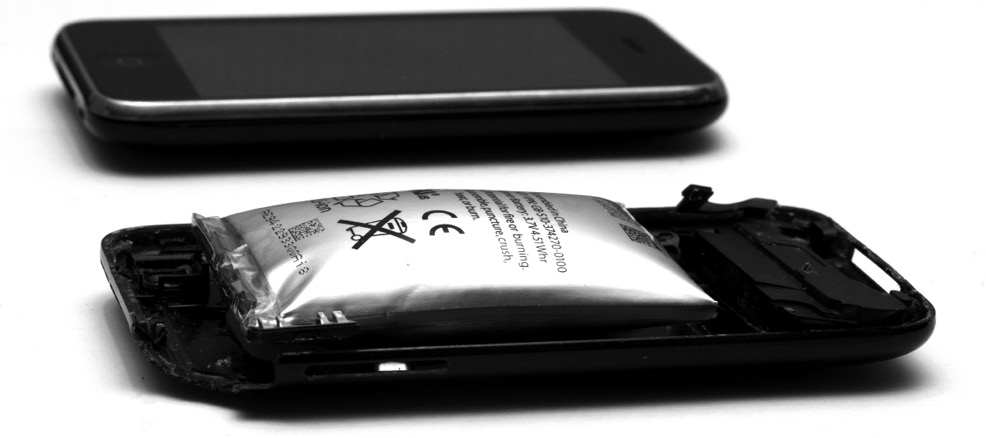
Figure 10-1. Damaged LiPo battery with bulging exterior coating. (Mpt-matthew; en.wikipedia.org/wiki/File:Expanded_lithium-ion_polymer_battery_from_an_Apple_iPhone_3GS.jpg; CC BY-SA 3.0)
Is your crew briefed and ready to go? If yes, power on the sUAS (after completing necessary checklists) to check lights and other markings. Do a control check (if possible) and gimbal check. Does everything move freely without abnormal resistance or noises? Next, you will want to do an idle check with motors on (again, only when ready and post-checklists). Check for any unusual noises or vibrations. If any are detected, shut down and investigate further before departing. The final check prior to initiating the mission is an airborne control check. For example, if you’re using a quadcopter, lift the aircraft off to a hover just above the ground. Input left/right, forward/back, yaw, and power inputs to ensure the system reacts as expected. Additionally, confirm that there are no weird noises or “ticks” experienced during this operational check.
Postflight Inspection Considerations
Upon completing a flight, the sUAS should be inspected again. Essentially you will want to check the same items as in the preflight inspection, noting any changes in aircraft status. Batteries will generally be warm because of discharging, but they should not be hot. Use caution if the battery condition changes between the preflight and postflight inspections (e.g., it begins to bulge). Note any issues in your maintenance log (explained later) and replace any parts that are damaged or at the end of their service life.
Inspection Intervals
More heavy-duty inspections should occur at intervals determined by your experience or manufacturer guidance, but the following are some ideas. Each week or every ten flights, conduct a more comprehensive visual inspection looking for cracks or other damage in the case, enclosures, on the landing gear, gimbals, sensor attachments, engine mounts, etc. Check retaining screws, such as those for the motors and shell. Clean battery and sensor attachments, as needed. Ensure that the batteries are being charged and discharged properly and that there are no major changes in either process. Recalibrate the navigation system (compass or inertial units) per manufacturer recommendations.
Every month or 30 flights, whichever is sooner, take a peek “under the hood” to verify that none of the wiring is coming loose or shows signs of wear (or even arcing—i.e., shorting of the electrical supply). Be sure all internal components are secure, and no unusual debris is present. Having a compressed air computer component cleaner handy will allow you to remove dust or debris without touching anything directly. Check the security of motors and gimbals, removing, replacing, and tightening them as needed. (Some industry gurus suggest removing and inspecting the motors at this interval, but you should only do so if you are confident you will not damage the system.) This is a good time to check to see if any software updates are ready to be installed. For this, it is helpful to be on the email list of the manufacturer of your sUAS, or alternatively, you can regularly check their website for software updates.
Battery Maintenance
The majority of sUAS these days use lithium polymer (LiPo) batteries, although you may occasionally come across a different type of battery. LiPo batteries are used because of their superior performance for high-demand situations in which light weight is desirable. In fact, these types of batteries are becoming commonplace even in commercial aircraft such as the Boeing 787. Unlike batteries commonly used in other applications (such as in cars or flashlights), LiPo types require a bit more care and attention, mainly because if treated carelessly they may catch fire—or less dramatically, they will not last as long (which is an issue as they are not cheap). Improper use can reduce the number of cycles you get out of the battery by 50 to 75%.
It is recommended that batteries be broken in gently. They will come charged at around 40% capacity (around 3.8V per cell), which has been shown to be an ideal level for long-term storage (keep that in mind). You should fully charge the battery before use, and then only fly until it reaches around 50% capacity for the first few cycles. This has been shown to extend the life of LiPo batteries.
When charging LiPo batteries, be sure you are using a unit specifically designed to do so. If you are using a charger that allows you to select the type of battery you plan to charge, be absolutely certain it is set to LiPo. Proper cell balancing is a vital part of extending LiPo useful life, so use a charger that has this capability whenever possible (some batteries handle this themselves). Never overcharge your batteries (i.e., above 4.2V). This should not be a problem in most cases, as chargers have safety features and automatic shutoffs. In short, know not only your batteries but also the ins and outs of your chargers. Also, respect the maximum charge “speed” of your batteries. The general rule of thumb is to use 1C (multiply this by the battery rating—e.g., a 2200 mAh battery could safely be charged at 2.2A). Some batteries can be charged up to 3C, but more than this is not recommended. Considering that the majority of batteries are manufactured in China where quality assurance is not always high, the harder you charge your batteries, the higher the risk of bad things happening.
Do not charge cold (near or below freezing) or hot batteries; try to charge them only when they are at room temperature. Batteries that are being charged properly should not get hot. If they start to increase in temperature, stop charging. Do not try to charge damaged or bulging batteries. Also, do not “top off” batteries. If they are nearly fully charged, do not try to charge them to 100%. Never leave batteries to charge unattended, on or near flammable materials, or without special protective measures such as LiPo battery charging bags or fireproof containers.
To maximize the life of your batteries, do not over-discharge them. You should never allow battery capacity to get below 20% (3.6V per cell) unless you like buying new batteries. If you over drain your batteries, you may get as few as 50 cycles out of them compared to 150 to 300 cycles if treated properly. If you assume a 20-minute average mission, a 50 cycle limit on a $60 battery equates to 6 cents per cycle. Instead, if you get 300 cycles out of the battery, this results in a one penny cost per cycle. If you are flying a lot and abusing your batteries, these critical items can become a significant expense.
LiPo batteries have a range of temperatures at which they are most efficient. They do not like the cold—in fact, they can unexpectedly fail in temperatures near (or below) freezing. For multicopters, this means they will fall out of the sky, which is obviously not good for the aircraft or their payloads. Therefore, it is wise to keep batteries at room temperature prior to use. Alternatively, batteries that approach or exceed 60° Celsius (140° Fahrenheit) will result in battery damage and risk fire. In regards to storing batteries, a range of temperatures from 5 to 25°C (41 to 77°F) is best. Additionally, just as most new batteries are delivered, those you plan to store more than a few days should not be charged beyond approximately 3.8V per cell (around 40%). This will increase the longevity of your batteries and minimize the risks of damage or failure of internal components.
So when do you retire a battery? First, follow any manufacturer instructions. Second, batteries that consistently will not hold a minimum of 80% of full capacity should be removed from service. Third, once you get to 150–200 cycles, pay extra attention to battery performance, physical appearance, temperature, and charging times. Last, it is wise to track battery performance (i.e., how much flight time you get out of it) to gauge when it begins its final decline. When disposing of LiPo batteries, follow local regulations and policies as well as manufacturer instructions. The batteries should be fully discharged prior to getting rid of them. Do this outdoors and not on or near anything flammable. In order to avoid damaging sensitive components, do not use your sUAS to drain the power. Instead, connect a LiPo discharger or other slow discharging accessory. The discharging of damaged or puffy batteries is not recommended; take them to a battery recycling or disposal location.
Flight and Maintenance Logs
It is a good idea to maintain flight and maintenance logs (in fact, some operations require reporting to the FAA, so this is not optional in such cases). Keeping flight logs will ensure that you know exactly how much use your sUAS has seen. This will help you track the longevity of components—most importantly, the battery. If you notice that a fully charged battery does not last as long as it used to, it may be reaching the point at which it needs to be retired. Various vendors sell comprehensive sUAS logs (ASA offers a UAS operator logbook, and several applications for smartphones are available, as well).
Maintenance logs should also be kept to track any noted problems or component replacements. This will allow you to track how long a component has been in use, which helps determine the quality of components as well as if they are approaching their service limit (some manufacturers have recommended service limits to preclude unexpected failures). Both documents can be used to show that you are keeping track of operations and promoting safety of flight if any issues with the FAA or even legal issues occur. It can also serve as a means of tracking costs for business owners—which is never a bad idea, right?
Maintenance, Repair, and Replacement of Components
Regular inspection of your sUAS and its ground control station should preclude any major surprises regarding items in need of maintenance or repair. If it becomes time to replace an item that requires dismantling part of the sUAS, be sure to use manufacturer guidance and be careful! Also, you do not want to void your warranty, if one exists, so if in doubt, send the system back to the manufacturer for repair. Do not attempt to repair propellers. If they are damaged, they should be replaced. Other components should not be used beyond their service life, if one is specified. For some sUAS parts, only time will tell what their expected life is. How reliable are motors? Autopilots? Gimbals?
Ideally, your inspection, logging, and preventative maintenance plan will stay ahead of any major issues. If in doubt about a part or system, replace it; most things are modular and replaceable.
Review Questions
1. The ________ is responsible for ensuring that an sUAS is safe to operate.
A—owner
B—operator
C—remote pilot-in-command
2. While you are flying a mission, it appears that one of the engines of your quadcopter is not responding to your inputs. You should
A—keep flying as long as you are able to maintain altitude.
B—land immediately.
C—note the malfunction and complete the mission.
3. During your preflight inspection, you notice a small nick in one of the propeller blades. The best course of action is
A—to replace the propeller.
B—dress the propeller blade by filing away the nick.
C—use adhesives to strengthen the damaged section of the blade.
4. During installation of the sUAS battery, you notice that one side of the outer coating is bulging. You should
A—consult with the manufacturer to see if repair is possible.
B—use the battery, as bulging is normal.
C—discharge and recharge the battery.
5. After completing a flight, you notice that the sUAS battery is warm. What action should be taken prior to recharging the battery?
A—Discharge the battery completely.
B—No action is needed; begin recharging as soon as desired.
C—Wait until the battery cools to room temperature.
6. When should you replace an sUAS battery?
A—When it no longer will hold 40% charge.
B—When it no longer will hold 80% charge.
C—When it no longer will hold 100% charge.
7. What is the lowest percentage of battery capacity that you should allow to occur under normal circumstances?
A—0%
B—20%
C—40%
8. Which of the following should be avoided in terms of battery use?
A—Storing fully charged batteries for extended periods.
B—Discharging batteries to 20% during flight.
C—Balancing battery cells during the recharging process.
9. What precaution is needed while charging a lithium polymer battery?
A—Ensure that the plug provides adequate power to the charger.
B—Do not charge batteries on anything other than wood surfaces.
C—Place the battery in a battery charging bag.
10. Which is true about maintenance logs?
A—They are required by the FAA.
B—They provide a means of tracking component life cycles.
C—They are required by the manufacturer to maintain the warranty on the aircraft.
Answers:
1-C, 2-B, 3-A, 4-A, 5-C, 6-B, 7-B, 8-A, 9-C, 10-B